Configure Multi-Tenant
Multi-Tenant Overview
Multi-tenancy allows multiple tenants to use one system while isolating their data. It is disabled by default and is controlled by EnableMultiTenant. TenantRule supports DomainName, RequestHeader, and LoginInput. Framework middleware and tenant services identify the tenant for HTTP requests, and business Services reuse the initialized context.
How to Modify Multi-Tenant Configuration
First, locate appsettings.json under the Senparc.Web project.
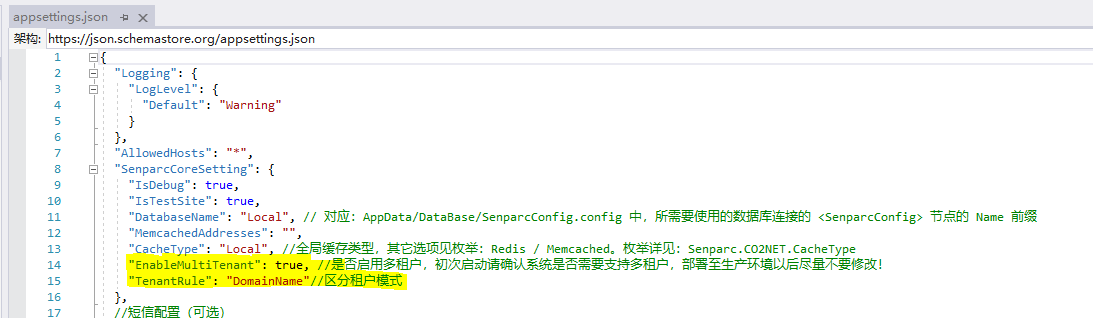
{
  "SenparcCoreSetting": {
    "EnableMultiTenant": true,
    "TenantRule": "DomainName" // DomainName | RequestHeader | LoginInput
  }
}
Tenant Resolution Rules (TenantRule)
| Rule | Source | Typical scenario |
|---|---|---|
DomainName | Request Host name (upper-cased, matched against TenantKey) | One dedicated domain per tenant |
RequestHeader | TenantKey request header | Gateway / front-end explicitly passes the tenant |
LoginInput | TenantKey claim in the admin login Cookie / JWT | Multiple tenants on one domain, tenant selected at login |
The matching logic runs in TenantMiddleware at the start of every request (TenantInfoService.SetScopedRequestTenantInfoAsync) and stores the result in the request-scoped RequestTenantInfo (tenant Id / Name / TenantKey / begin time). The tenant list is cached in FullTenantInfoCache (CO2NET cache strategy); any tenant create/update/delete invalidates the cache immediately.
Multi-Tenant Data Table Correspondence in System Modules
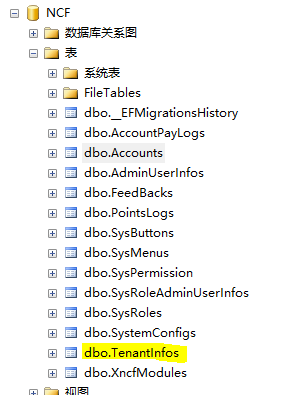
After the database is generated, a multi-tenant table will be automatically created, as shown below.
Changes in Other Tables in the Database
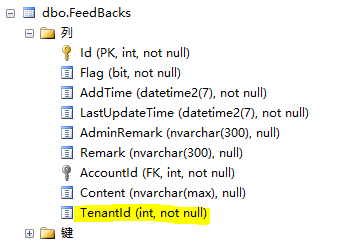
Tenant-isolated business tables contain a TenantId field, as shown below. The global tenant registry and global entities explicitly declaring IIgnoreMulitTenant are not filtered by the current tenant; do not treat them as ordinary tenant-isolated business tables.
Corresponding Relationship
The TenantInfos table manages the Ids of all tenants.
The TenantId in each table comes from the TenantInfos table.
From the corresponding relationship, you can see the implementation principle of multi-tenancy.
Services, Repositories, and Tenant Filters
Services own business logic and access data through injected IRepositoryBase<TEntity> or existing ServiceBase query/save methods. The NCF context used by the repository centrally applies current-tenant and soft-delete filters. Ordinary business queries need neither repeated TenantId/!Flag predicates nor IgnoreQueryFilters() to bypass those constraints.
The filter uses the current scope's tenant. It does not enumerate all tenants or automatically check the registry's Enable property for every business query. HTTP requests use a valid tenant through framework identification; cross-tenant background tasks obtain enabled-tenant scopes through the public entry point below.
Host-Wide Background Tasks (2026-10-02 Development Line)
IHostedService / BackgroundService does not pass through HTTP tenant middleware. IServiceScopeFactory.CreateScope() creates only a DI scope, not an identified tenant. These tasks should inject Senparc.Ncf.Core.MultiTenant.IBackgroundTenantScopeFactory instead of using cache reflection or implementing tenant enablement checks in a business module.
Normal NCF startup already registers the scope factory. The Tenant module's IBackgroundTenantProvider supplies enabled tenants through the existing FullTenantInfoCache. The factory fills the scope's RequestTenantInfo before business Services are resolved; an additional Service SetTenantInfo() call is normally unnecessary.
Scan All Enabled Tenants
For WeixinClaw account discovery, inside a background service with an injected _tenantScopeFactory:
var accounts = new List<(int TenantId, int AccountId)>();
await _tenantScopeFactory.ForEachEnabledTenantAsync(
    async (services, cancellationToken) =>
    {
        var accountService = services.GetRequiredService<WeixinClawAccountService>();
        accounts.AddRange(
            await accountService.GetPollingAccountsAsync(cancellationToken)
                .ConfigureAwait(false));
    },
    stoppingToken).ConfigureAwait(false);
The example uses Microsoft.Extensions.DependencyInjection, Senparc.Xncf.WeixinManager.Domain.Services, and System.Collections.Generic. Callbacks execute in tenant order and access repositories through independent scopes. The factory disposes each scope after callback completion, cancellation, or failure. Await business operations inside the callback; do not retain scoped Services or IServiceProvider in long-lived tasks. Carry only task metadata, such as account and tenant IDs, and obtain a new scope for each subsequent execution.
Execute for a Specific Tenant
using var scope = await _tenantScopeFactory.TryCreateScopeAsync(
    tenantId, stoppingToken).ConfigureAwait(false);
if (scope == null)
{
    return;
}

var accountService = scope.ServiceProvider.GetRequiredService<WeixinClawAccountService>();
var account = await accountService.GetObjectAsync(x => x.Id == accountId)
    .ConfigureAwait(false);
TryCreateScopeAsync returns null when the requested tenant is no longer enabled or does not exist. Stop the corresponding business task instead of falling back to cross-tenant queries. The caller disposes a successful scope, as with using var above. WeixinClaw polling cancels inactive account tasks after scanning and consistently handles completion, host shutdown, and resource disposal inside cancellation callbacks.
Single-Tenant Mode, Errors, and Upgrade Constraints
- With multi-tenancy disabled, the enumeration entry point runs once in the default scope. The specific-tenant entry point also uses the default scope, without querying the tenant registry.
- Multi-tenant mode throws if the Provider is missing or returns invalid or duplicate tenants. It does not continue with tenant ID
0or disabled filters. - Adding the shared entry point does not automatically migrate every existing background task. WeixinClaw has adopted it; audit other modules separately.
- This upgrade requires no entity changes or new database migration. Upgrade the related libraries/modules and restart the host to activate the new DI registrations.
Related guides: Core, Repository, Service, and Version Upgrade Notes.
Data Isolation Mechanism (2026-09 Upgrade)
The XNCF module database context (XncfDatabaseDbContext, the base class of all XNCF module DbContexts) is now aligned with the multi-tenant behavior of SenparcEntitiesDbContextBase:
- Global query filter: When multi-tenancy is enabled, entities implementing
IMultiTenancybut notIIgnoreMulitTenantautomatically get aTenantId == current request tenant Idfilter (combined with the soft-delete!Flagfilter). All regular business queries can only see their own tenant's data — no manual filtering in business code. - Automatic TenantId stamping:
SaveChanges/SaveChangesAsyncautomatically writes the current request'sTenantIdonto new entities; business code never needs to set it manually. - Global-table exemption: Entities implementing
IIgnoreMulitTenantopt out of tenant filtering and auto-stamping — the tenant registryTenantInfo(theTenantInfostable intentionally has noTenantIdcolumn) and XncfBuilder preview/development jobs are examples. - Zero impact in single-tenant mode: With
EnableMultiTenant: false, only the soft-delete filter applies — behavior is identical to previous versions.
Login and Tenant Resolution
- Web (Cookie) login: The login page shows an optional tenant input when multi-tenancy is enabled. The login flow first resolves the tenant from the entered
TenantKeyand sets the request tenant context, then queries the admin account; on success theTenantKeyis written into the authentication Cookie (under theLoginInputrule, subsequent requests resolve the tenant from this claim). - JWT (desktop / backend API) login:
LoginAsyncalso accepts aTenantKeyparameter — it resolves the tenant and sets the tenant context before querying the account (otherwise the global tenant filter would hide that tenant's accounts), and writesTenantKeyinto the JWT claim so theLoginInputrule works for JWT-authenticated requests as well. - When the tenant does not exist or is disabled, login returns the same generic message as "wrong account or password", avoiding tenant enumeration.
Tenant Ownership of Admin Accounts
- Accounts created by tenant initialization (the "Initialize" action on the tenant management page) and accounts created within a tenant context are automatically assigned to that tenant (
TenantIdstamped automatically). - The first admin created during system installation (
TenantId = 0) is a system-wide account, visible in requests that do not match a tenant (e.g. anonymous requests under theLoginInputrule). - The tenant management page (
/Admin/TenantInfo) adds an Admins column showing the admin account count per tenant, supporting disable/delete decisions.
Tenant Deletion Protection
Tenant deletion (OnPostDeleteAsync) enforces three built-in guards, checked before any deletion:
- The tenant currently in use cannot be deleted;
- At least one enabled tenant must remain (deleting the last enabled tenant is rejected);
- A tenant with existing admin accounts cannot be deleted (prevents orphaned accounts — reassign or delete the accounts first).
On failure the specific reason is returned (localized in Chinese and English) and tenant data is left untouched.
AdminChat Per-Account Isolation and Usage Statistics
The admin AI assistant (AdminChat) is isolated per admin account:
- Each account can only view/operate sessions and messages it created (session list, detail, sending messages, archiving, deletion, message feedback, Harness trajectories, etc. all perform ownership checks; cross-account access returns "session not found or forbidden").
- Super administrators (
administratorrole) can open a Usage Stats panel on the AdminChat page: per-account total/active/archived/deleted session counts, message counts and last-active time — counts only, no session or message content is exposed, satisfying admin audit needs in multi-tenant deployments. - With multi-tenancy enabled, usage statistics are also constrained by the tenant filter (a super admin only sees stats of accounts within their own tenant).
Upgrade Notes (Existing Data)
- Before enabling multi-tenancy, confirm that your business tables already have the
TenantIdcolumn (XNCF module migrations include it; theTenantInfostable intentionally does not). - After enabling multi-tenancy, pre-existing rows whose
TenantIddoes not match the current tenant become invisible to that tenant. To assign legacy data to a tenant, update the corresponding tables'TenantIdto the target tenant Id at the database level (TenantId = 0denotes system-wide data). - The
TenantInfostable hides the base-classTenantIdvia a[NotMapped]shadow property and does not participate in multi-tenant mapping; do not remove that attribute, otherwise EF Core will try to map a non-existent column and tenant queries will fail.